
Is Your Mouse Wrecking Your Posture? Upgrade to an Ergonomic One for All-Day Comfort
Ever wrapped up a long day at your desk only to feel like your wrist just lost a wrestling match? Same here. It’s time to ditch the strain and level up your setup with a mouse that works with your body—not against it.
Welcome to the world of ergonomic mice—where comfort meets productivity and your spine gets the alignment it deserves (think yoga vibes, but for your posture).
I’ve explored 7 top-notch ergonomic mice that promise to turn your work-from-home setup into a pain-free paradise. Whether you’re clicking away for work or scrolling through social media, these mice are here to keep you comfy and of the best ergonomic mice that can transform your work-from-home grind into a more comfortable, pain-free experience. Whether you’re cranking out emails or casually doomscrolling, these picks will keep your wrist supported and your workflow smooth., ensuring your wrist feels supported, not sorry!
Our Top Selections



Evoluent VM4R Vertical Mouse
An outstanding choice for professionals, this vertical mouse excels in comfort and functionality, with excellent support and adjustable settings for any task.
The Evoluent VM4R Vertical Mouse 4 is a superb ergonomic mouse that promotes hand comfort with its upright design, simulated for optimal wrist alignment. This mouse focuses on reducing wrist and hand strain, especially for users with carpal tunnel syndrome or similar issues.
Key Features:
For anyone serious about preventing wrist pain while maximizing work efficiency, the Evoluent VM4R offers a high-quality experience that’s worth the investment.
Logitech MX Vertical Wireless Mouse
This mouse is a revolutionary design aimed at reducing wrist strain while maintaining high performance. The innovative vertical angle makes it perfect for users who spend long hours at the computer without discomfort.
The Logitech MX Vertical Wireless Mouse is designed with an emphasis on reducing wrist pressure and forearm strain, making it an excellent choice for individuals prone to repetitive stress injuries. Its unique 57-degree vertical angle ensures a natural handshake position, which minimizes muscle activity without sacrificing performance. This mouse is equipped with a 4000 DPI high-precision sensor, which means you can enjoy 4x less hand movement compared to traditional mice.
Key Features:
If you're looking for an investment that prioritizes your comfort and health while working, the Logitech MX Vertical is a fantastic choice.
Microsoft Sculpt Ergonomic Mouse
This mouse blends seamlessly with Microsoft products, providing excellent performance and comfort. It’s perfect for users who prioritize wrist health without compromising on features.
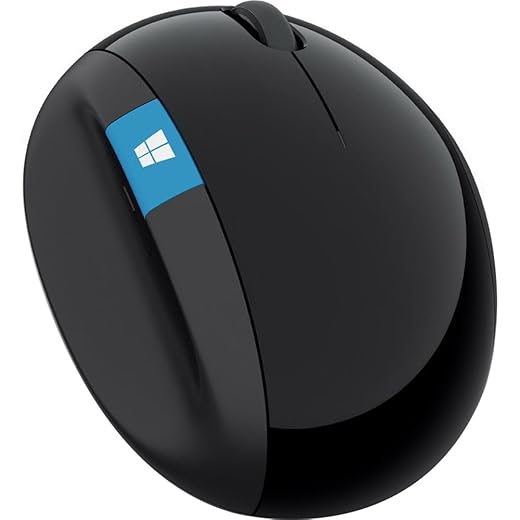
The Microsoft Sculpt Ergonomic Mouse is an excellent solution for those who require a comfortable mouse to use for extended periods. Its design maximizes wrist comfort and features a thumb scoop that encourages correct hand positioning, making it a favorite among users who value ergonomic principles.
Key Features:
If your work involves extensive computer use and you're already using Microsoft products, this mouse could be a strong and efficient addition to your setup.
J-Tech Digital Wired Ergonomic Mouse
This mouse’s thoughtful ergonomic design helps to alleviate wrist strain, making it a solid pick for prolonged use at work.
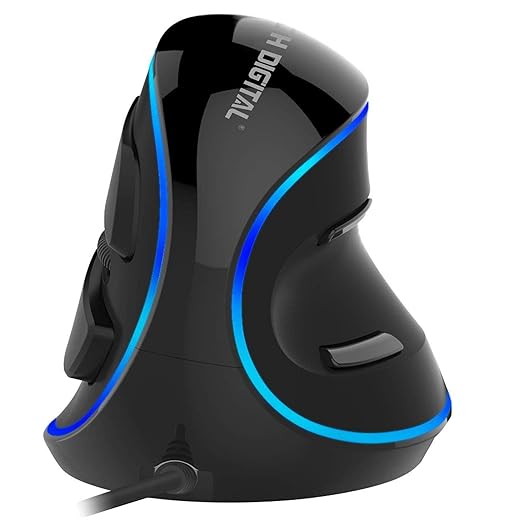
The J-Tech Digital Wired Ergonomic Vertical USB Mouse is beautifully designed to provide maximum comfort while assisting users with wrist and hand strain. This mouse features an ergonomic ‘handshake’ design, which helps to reduce the discomfort associated with traditional mouse devices.
Key Features:
If you’re seeking a mouse that promotes comfort while using the computer for long hours, the J-Tech Digital model could be an essential addition to your workspace.
Anker 2.4G Wireless Vertical Mouse
For anyone seeking relief from wrist discomfort on a budget, the Anker mouse does the job well. It combines crucial ergonomic features with an accessible price, making it a popular choice among users.
The Anker 2.4G Wireless Vertical Ergonomic Optical Mouse is designed to provide an affordable yet effective solution for users looking to alleviate wrist pain and strain. Its scientific ergonomic design promotes a neutral handshake position for healthier wrist and arm comfort during long hours of use.
Key Features:
If you are in need of an ergonomic mouse that provides comfort without breaking the bank, the Anker 2.4G is certainly worth considering.
DeLUX Wireless Ergonomic Vertical Mouse
This device is a great entry-level ergonomic mouse that provides comfort without the hefty price tag, although it may require user adjustment.
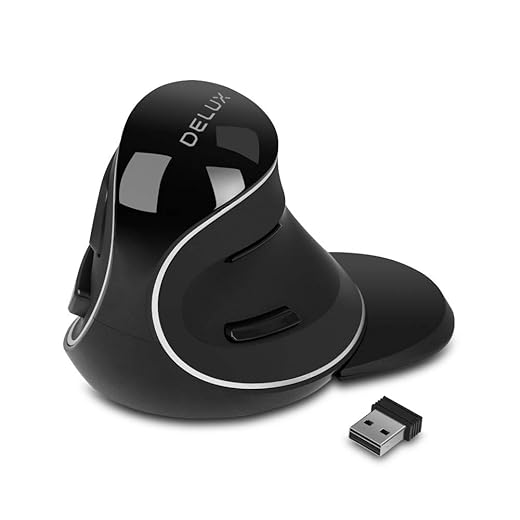
The DeLUX Wireless Ergonomic Vertical Mouse is designed with a unique volute bionic structure that aims to lessen arm discomfort while ensuring smooth usage. Its ergonomic features are targeted towards those who spend numerous hours operating a computer, providing significant support for larger hands.
Key Features:
For users on a budget searching for an ergonomic mouse, the DeLUX model offers exceptional value while prioritizing comfort and usability.
Lekvey Wireless Ergonomic Mouse
This ergonomic mouse is budget-friendly, easy to use, and provides good comfort, though some may find it bulkier.
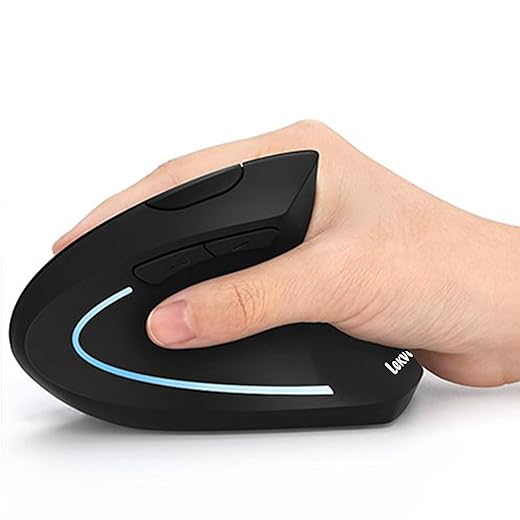
The Lekvey Wireless Ergonomic Mouse delivers an excellent introduction to ergonomic mouse options, combining comfort and utility without spending too much. Its vertical design encourages a more neutral wrist position, which is essential for minimizing strain during lengthy computer tasks.
Key Features:
Overall, the Lekvey ergonomic mouse is a commendable starter option, especially for those seeking to ease wrist discomfort while working at the computer.
Final Thoughts
If you're looking for top-tier ergonomics, I highly recommend the Evoluent VM4R Vertical Mouse. With a stellar rating of 9.5 out of 10, its customizable settings and exceptional support make it a winner for anyone serious about elbow and wrist health. For a more budget-friendly choice, check out the Anker 2.4G Wireless Vertical Mouse. At 8 out of 10, its affordable price and key ergonomic features make it perfect for those wanting relief without breaking the bank!
FAQs
Ergonomic mice are designed to fit the natural shape of your hand, reducing strain on your wrist and forearm. This can help lower the risk of repetitive strain injuries and ensures greater comfort during long hours of use.
Consider factors like your preferred grip style (palm, claw, or fingertip), the size of your hand, and whether you need a wired or wireless option. Try to test a few models to find the one that feels the best in your hand.
Absolutely! Vertical mice can significantly reduce wrist strain and promote a more natural hand position. If you spend a lot of time using a mouse, the benefits far outweigh any initial adjustment period.
Yes! Many ergonomic mice are designed for both productivity and gaming. Just make sure to choose one with the right features (like adjustable DPI) that suits gaming needs.
It's recommended to take breaks every 30 minutes. Stand up, stretch your arms and wrists, or switch tasks for a bit to help reduce strain and keep your blood flowing.


Leave a Reply